Predicting the basic acoustic properties of a rectilinear control room. V2.68
This Excel spreadsheet is available for Microsoft Office 365: Click here to download
Instructions
This spreadsheet should be operated in the following way:
- Generally, you would start by configuring sheet "Room Ratios".
- Spin buttons have been provided to make it easier to see how your changes effect the properties of the room. You can simply increment or decrement a value by using the spin buttons to the right of the corresponding input field. This saves you having to type a value, press enter, then look at the result; then type another value, press enter, look at the result... etc.
- If, for security reasons, your installation of Excel has Macros disabled, then you will still be able to use the spreadsheet, but the spin buttons will not function.
- On sheet Room Materials, if you want less than four materials for any surface, then set the id of the unused materials to n000, where n is 1, 2 or 3 depending on the type of surface you are configuring.
- If a material id is set to n000, then you will not be able to adjust the percentage area.
Sheet Room Ratios
This sheet is generally your starting point.

- There are seven pre-defined room ratios and one user defined.
- If the dimensions of your room do not match one of the predefined ratios, then you will need to calculate the H:W:L ratios of your room.
- The room dimension ratios are always expressed relative to the height of the room. Therefore, the value for H is always 1.
- E.G. If your room is 9' by 12'6" by 16' (HxWxL), then your room ratios are as follows:
H =  9'   = 108",
W = 12'6" = 150",
L = 16'   = 192"

H = 108 / 108 = 1
W = 150 / 108 = 1.39
L = 192 / 108 = 1.78

H:W:L = 1:1.39:1.78 - Enter your room ratio values in cells E26 and F26.
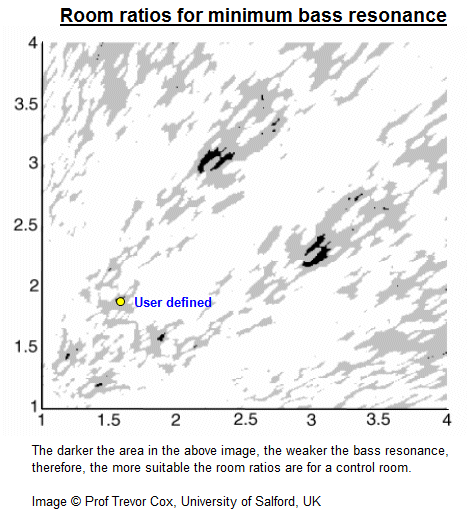
- The W:L part of your room ratios will now be shown on the bass resonance chart to the right. Trevor Cox (et al) from the University of Salford has determined which room ratios are preferable for a control room on the basis of the degree of bass resonance. The dark areas indicate room ratios giving minimum bass resonance.
Next, go to sheet Initial Values
Sheet Initial Values
- Select the required units for your room and enter the width.
- Select the correct room ratio letter in cell C7. If you are using the User Defined ratios, then this will be the letter H.
- If you have calculated the room dimension ratios correctly, then you will see the dimensions of your room
appear in cells C12:E12.
It is possible that your room dimensions won't come out exactly right. If so, this could be due to rounding errors in your ratios. You may enter as many decimal places as are required for accuracy, but only two decimal places will be displayed. - The speaker directivity value is only used for calculating the distance of the direct/diffuse field boundary from the speaker.
- The air temperature is assumed to be 20°C. Any change to this value will alter the speed of sound, and will therefore have a very slight effect on the acoustic properties of your room.
- The low frequency cutoff is a user defined, arbitrary upper limit to be used when analysing the modal behaviour of your room. The number and spacing of modes will be calculated up to this user defined limit.
- The two graphs on this sheet show the room's overall RT60 and on-axis RT60. When designing a control room, the on-axis RT60 graph is particularly useful for preventing flutter echo. Make sure that the RT60 values are roughly equal for all three axes. If one axis has a significantly higher RT60 value than the others, then you're probably heading for trouble in the form of a flutter echo!
Sheet Room Materials
- Here you can experiment with different surface materials for your room
- Each surface may be made from up to four materials.
- The surface area of each material is expressed as a percentage. You must ensure that these values add up to 100%!
- If you are comparing the predictions made by this spreadsheet with the predictions from other software
products, please ensure that you select materials on the basis of their absorption coefficients, not the
description.
Different organisations quote absorption figures for standard building materials, but if you compare these values across different sources, they could well differ. - If you require a surface material that does not appear in the list, then you may enter its absorbency values in the appropriate User Defined sections of sheet Absorption Coefficients.
Sheet Basic Properties
- This sheet is entitled Basic Properties for the simple reason that all the values quoted are calculated using statistical assumptions. It is very important that these assumptions are understood, otherwise you will try to read too much meaning into the values presented.
- Perhaps the biggest mistake made by people using statistical reverberation time equations is not to realise the fundamental assumption upon which these equations operate: namely, that the sound field in the room is fully diffuse! However, if this assumption is not accounted for, then people can become both mystified and frustrated by the large discrepancies that can be occur between a room's predicted and measured RT60 values.
- Therefore, in order for any of these equations to behave as useful prediction tools, you must first ensure that your room has an adequate degree of diffusion (a requirement that is almost always overlooked!).
- In reality, it is not desirable for a room to have a fully diffuse sound field. However, in order for a room to function as a good listening/performance environment, there must be sufficient diffusion in the horizontal plane to create a good level of listener envelopment (lateral fraction). This will also ensure that the predictions made these RT60 equations will be close enough to the measured value to be considered useful.
- For practical purposes, the lower limit of diffuse field behaviour in a room is defined by the Schröder frequency. Below this frequency, the sound field cannot be considered diffuse due the presence of standing waves. Any quoted RT60 values that fall below the Schröder frequency should be ignored!
- Since different RT60 equations perform their calculations in different ways, properties such as the Schröder frequency, modal resonance bandwidth, and the reverberant field rise time etc, are all quoted multiple times using the values from each of these different equations - hence the discrepancies.
- It is very difficult to say exactly which equation will provide you with the most accurate prediction for your situation. The best solution is to perform a prediction, then do an actual measurement (usually RT25 * 3), and see who was closest to the truth!
- The range from the lowest possible resonant mode to the Schröder frequency is shown laid overtop of an extended piano keyboard. This should help make the band of modal resonance understandable in a musical context.
Sheet Resonant Modes
- This sheet contains two graphs. The top one shows the contribution made by the first 200 modes to the overall sound field and the lower one shows the interval (in Hz) between adjacent modes.
- The top graph is an attempt to quantify how audible a given mode may be within the overall sound field. It is assumed that once a mode's contribution drops to below 10%, in practical terms, it will be completely inaudible and can therefore be ignored. This figure of 10% is somewhat arbitrary and may well need to be revised (probably upwards).
- The lower graph shows the spacing in Hz between the first 200 modes. The smoother this plot, the better. Large spikes in this plot indicate that the corresponding mode is quite widely spaced from its neighbours, and may therefore be more audible.
- The preferred way now of describing modal spacing is to calculate the standard deviation. This value is given on sheet Basic Properties
Sheet RT60
This sheet shows the raw data from which the RT60 graphs are constructed.
Sheet Schröder Diffusers
This sheet allows you to calculate the basic dimensions of a Schröder diffuser. You may use any prime seed from 3 up to 31, and it will calculate the basic well widths and depths based on your specified design frequency.
Sheet Absorption Coefficients
This sheet stores all the absorption coefficients that can be selected from sheet Room Materials. If this sheet does not contain the materials you require, then you can enter your own absorption coefficients in any one of the five User Defined materials.
Sheet Intermediate values
This sheet holds all the intermediate calculation values. It is from this sheet that you can see things like the Sabins value of each room surface, the total Sabins value of the room, and the room's on-axis absorption.
There is a single input field on this sheet in which you can enter the frequency of A above Middle C (concert pitch). This value has now been standardised at 440Hz, but in the past it has varied widely between different countries, and even different cities within the same country. For instance, some English church organs from 1720 had a concert pitch as low as 380Hz, whilst the German organs played by J.S. Bach at around the same time were tuned to a concert pitch of 480Hz.
Whatever value you enter here affects the relative position of the notes on the piano keyboard shown on sheet Basic Properties
Sheet Acknowledgements
All my source information is listed here. I believe that all the sources quoted here are accurate, reputable and respected in the field of acoustics.
Version History
Bug fix in V2.68 - 27th December, 2020
Correction of a bug in cell O18 of sheet 'Intermediate Values'. Thanks to Mike VP for spotting this
Conversion of Excel file to Office 365 format
Enhancement in V2.67 - 9th February, 2011
In response to a request by Peter Harper of Acoustiguard, I have increased the number of custom materials per surface type from 1 to 10.
Enhancement in V2.66 - 18th October, 2010
In response to comments by Andrzej Tybinkowski about the first graph on sheet Resonant Modes, I have adjusted the graph in a way that I believe shows the information in a clearer manner.
Each resonant mode within a room contributes to the "colour" of the overall sound field. This graph attempts to visualise that contribution in a way that will hopefullly help you produce a room with as flat a sound field as possible.
However, it should be noted that the calculated contribution of a given mode is based on the average reflectivity along the X, Y and Z axis, and the mode numbers. Therefore, once you install equipment in the room and furnish it, these calculations will be much less accurate because the modal response of the room will change in a way for which this spreadsheet cannot account.
Bug fix in V2.65 - 12th October, 2010
Correction to edge length calculation on sheet 'Initial Values'. Thanks to Glenn Stanton of Runnning Brook Design for spotting this.
Bug fix in V2.64 - 13th April, 2010
- Removed sheet protection on all sheets.
- Added some explanatory comments
Bug fix in V2.63 - 30th July, 2009
Thanks to Josef Schinabek for identifying a bug in one of the calculations for Wall 2 on the "Intermediate Values" sheet.
Bug fix in V2.62 - 15th September, 2005
Thanks to Jim Andrews of Active Power for identifying a small, but significant bug in the way absorption was being calculated at 4KHz.
New features in V2.61 - 11th May, 2004
Removed reference to a non-Microsoft OCX file. Depending on your version of Excel, this was causing various compile or "module not found" errors when executing the VBA subroutine doButtonChange().
New features in V2.6 - 28th April, 2004
- Each room surface may be made from up to four different materials.
- Previously, if you had been using a spin button to enter values into a field, then you typed a totally
different value into the field, subsequent use of the spin button would reset the field back to the value held in
the spin button object.
This behaviour has now been fixed so that the spin button will increment the value in the field, not its own internal value. - Added Millington's equation.
- The number of materials on the Absorption Coefficients sheet has been extended. All sources have been quoted.
- Various optimizations have been made to improve recalculation speed.
New features in V2.5 - 20th April, 2004
- Switch between metric and imperial units.
- Significantly increased the number of materials available for selection.
- Thickness, cavity depth, absorption layer thickness and perforation %age added where applicable for surface materials.
- Information source for all absorption figures quoted.
New features in V2.4 - 15th March, 2004
- The frequency range defined from the lowest mode up to the Schröder frequency is plotted overtop of an extended piano keyboard.
- The Width:Length room ratios are plotted overtop of Trevor Cox's chart showing ratios of least bass resonance.
- Removed references to dubious sources on the Acknowledgements sheet.
New features in V2.3 - 5th March, 2004
- Moved the basic room properties onto their own sheet.
- Moved RT60 and On-Axis RT60 graphs onto the Initial Values sheet.
- Implemented an auto sort feature of the resonant mode data on sheet Resonant Modes.
- Added an On-Axis RT60 graph to help avoid the inadvertent creation of a room with a flutter echo.
- Added a "User Defined" material to allow for the use of custom absorption values.
- Added a check to confirm whether a room's ratios fell within the EBU or IEC recommended ranges.
- Corrected broken links on Acknowledgements sheet
New features in V2.2 - 13th February, 2004
- Added a check to confirm whether a room's ratios fell within Bolt's recommended ranges.
- Added an Acknowledgements sheet
New features in V2.1 - 12th February, 2004
- Allowed the user to change between 8 different room dimension ratios, one of which is user defined.
- Added spin buttons to allow rapid parameter changes.
- Added Reinhard Neubauer's modification Fitzroy's equation. This is labelled Fitzroy 2 to distinguish it from the original equation (labelled Fitzroy 1).
- Added Arau's equation.
- Plotted the resonant modes as a graph rather than a table of numerical data.
- Plotted attenuation of resonant modes based on mode order (I.E. the number of reflections) in order to determine the contribution made by that mode to the overall resonant field.
- Added a sheet to calculate the effective bandwidth and well dimensions of a Schröder diffuser for a given prime seed.
- Simplified material ID's on Absorption Coefficients sheet.
New features in V2.0 - Not released
Rearrangement of information in a more logical manner.
Initial development V1.0 - Not released
- First cut proof of concept development
- Calculated RT60 values for three rooms built according to Sepmeyer's Golden Ratios.
- Implemented Sabine's, Eyring's, Kuttruff's correction to Eyring, and Fitzroy's equations.